Volume Profile & Anchored VWAP System
What makes this suite stand out
- Quick mode selection: FRVP, AVWAP, or both combined
- Fixed Range Volume Profile with flexible period selection
- Profiles can be calculated using preset periods or a custom start date
- Optional Volume Delta with two visualization modes
- Anchored VWAP with up to three optional band pairs
- Periodic VWAP as band source (1D, 1W, 1M, 1Q, 1Y) — in addition to the custom anchor date
- Optional Value Zone fill between Band −1 and Band +1
- Two additional Anchored VWAP lines
- HTF POC levels (1D / 1W / 1M)
- HTF VWAP system: Daily, Weekly, Monthly, Quarterly, and Yearly VWAP lines
- Optional FRVP, AVWAP, and VWAP tables for quick chart context
- Global toggles to show or hide Tables, HTF POCs, and HTF VWAPs at once
- Optional comprehensive alert system
- Extensive visual and structural customization (screenshots use the JustIndicate default theme)
The Volume Smart Suite combines an advanced Fixed Range Volume Profile and an Anchored VWAP system with HTF POC levels and HTF VWAP levels in a single flexible indicator.
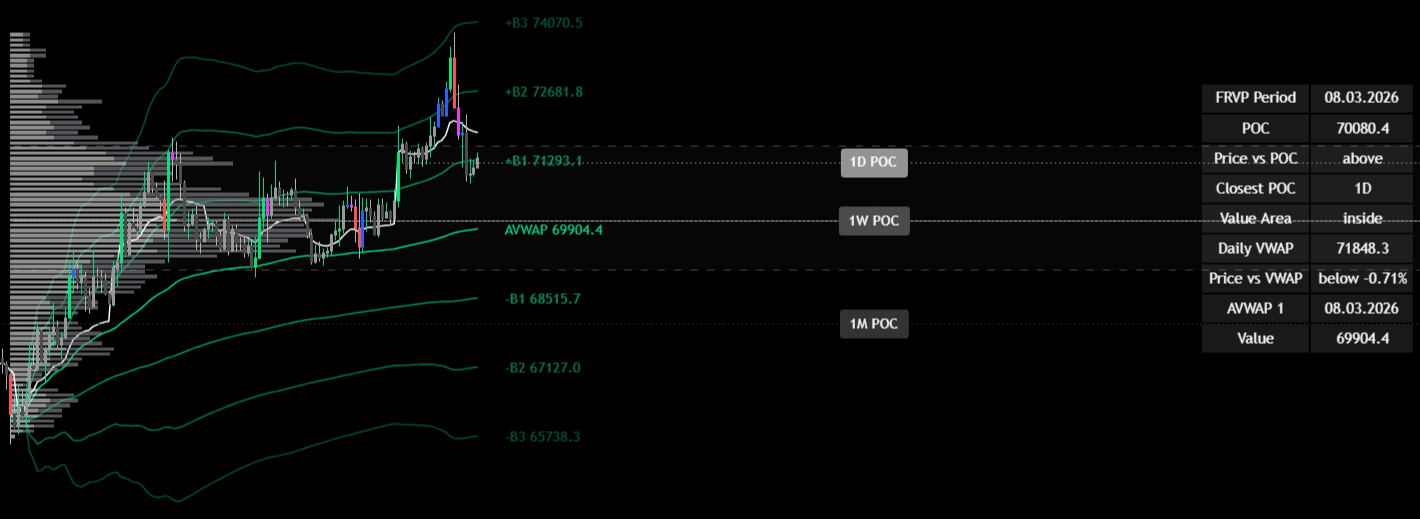
Mode Selection & Quick-Access Controls
The indicator can be used in three different modes:
- FRVP
- AVWAP
- FRVP + AVWAP combined
This allows traders to switch between volume structure, VWAP reference levels, or a combination of both.
Additional toggles for quick visibility control:
- Tables (FRVP, AVWAP, and VWAP)
- HTF POCs
- HTF VWAPs
Each group can be shown or hidden at once without adjusting individual settings.
Fixed Range Volume Profile (FRVP)
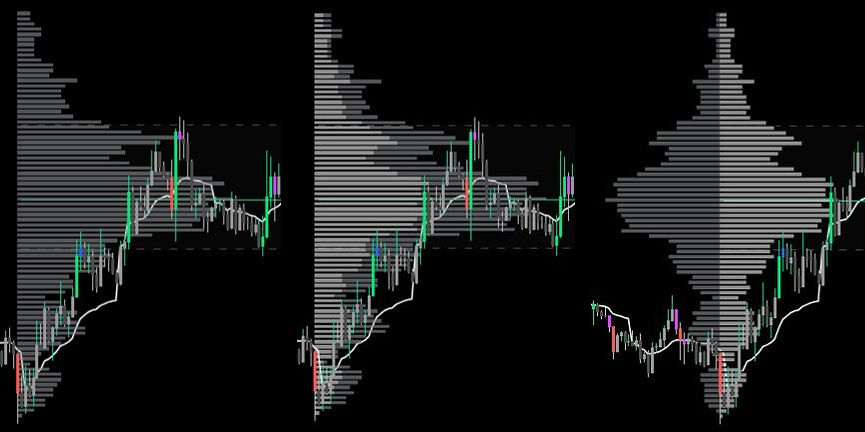
Fixed Range Volume Profile (FRVP) visualizes traded volume across price levels within a defined period.
- Volume profiles based on preset time periods
(for example hours, days, weeks or months) - Alternatively a user-defined start date
- POC, VAH and VAL can be enabled individually
- Optional Value Area highlighting
- Optional Volume Delta with two visualization modes
- Balanced View to improve visibility of low-volume rows
- Adjustable profile resolution and width
All profile elements can be enabled or disabled individually.
Anchored VWAP
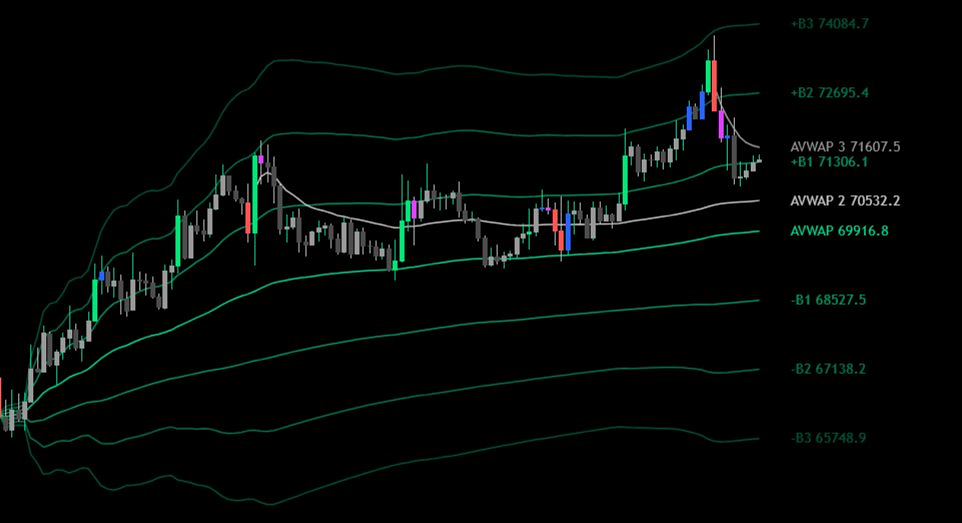
Anchored VWAP (Volume Weighted Average Price) tracks the average price from a selected starting point and can act as a dynamic reference level.
- Anchored VWAP with optional bands
- Bands calculated using standard deviation or percentage
- Up to three band pairs
- Custom anchor date
- Periodic VWAP as band source (1D, 1W, 1M, 1Q, 1Y) — in addition to the custom anchor date
- Optional Value Zone fill between Band −1 and Band +1
Additional anchors:
AVWAP 2 / AVWAP 3
- Independent VWAP line
- Custom anchor date
- Optional labels
Each VWAP line can be enabled or disabled independently.
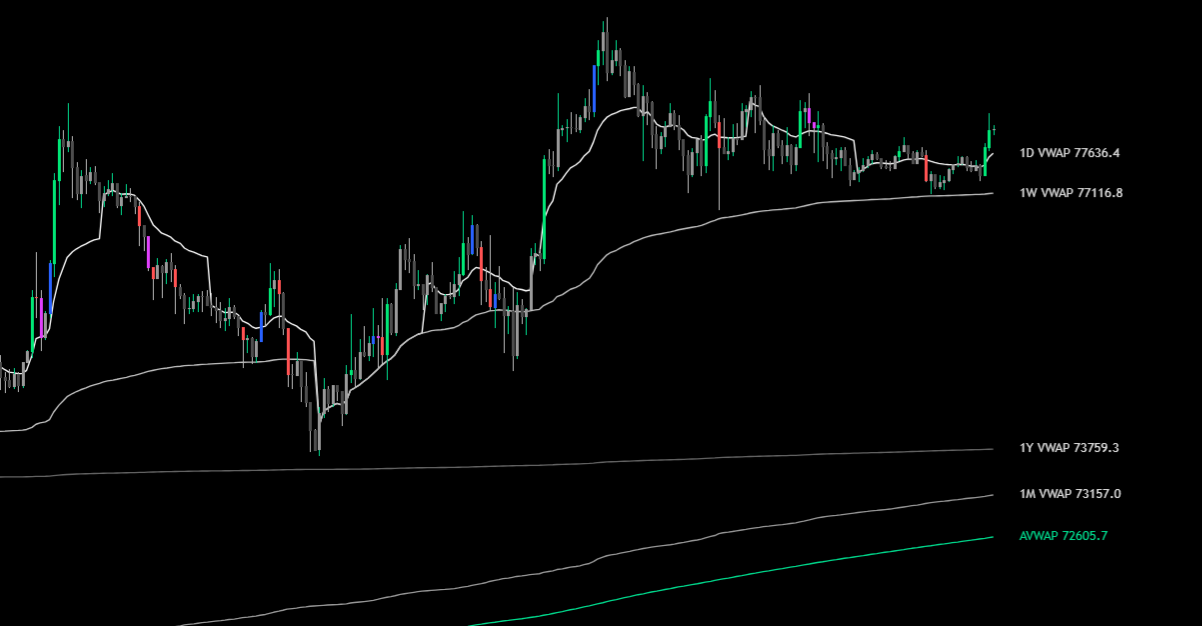
HTF VWAP
VWAP (Volume Weighted Average Price) is a dynamic average price weighted by trading volume. It moves with each new candle and resets at the start of each period.
Optional higher timeframe VWAP lines as dynamic reference levels:
- Daily VWAP
- Weekly VWAP
- Monthly VWAP
- Quarterly VWAP
- Yearly VWAP
Each line can be enabled individually.
Higher Timeframe Volume References
Point of Control (POC) represents the price level with the highest traded volume within a given period.
Optional Point of Control (POC) levels from higher timeframes:
- 1D POC
- 1W POC
- 1M POC
Each level can be enabled individually.
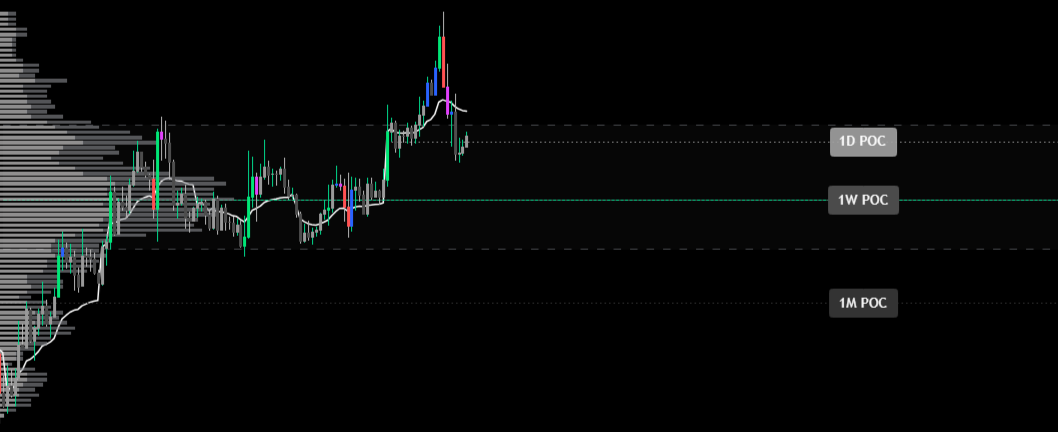
Table Section
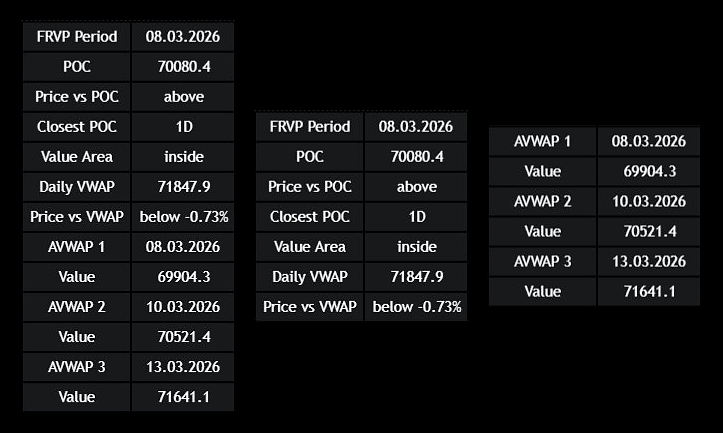
The table section provides a compact overview of key volume and VWAP information directly on the chart.
- Optional FRVP Table
- Optional AVWAP Table
- Optional VWAP Table
- All tables can be enabled independently
- If all are active, the information is combined into a single table
- FRVP table shows key volume profile information
- AVWAP table displays anchor date and current value of active AVWAP levels
- VWAP table displays current values of all active HTF VWAP lines
- Customizable position, background color, and text size
Alerts
Alerts are available for key price levels:
- AVWAP crosses (up / down)
- AVWAP band crosses (up / down)
- AVWAP 2 and AVWAP 3 crosses (up / down)
- Daily, Weekly, Monthly, Quarterly, and Yearly VWAP crosses (up / down)
- FRVP POC crosses (up / down)
- VAH / VAL crosses (up / down)
- 1D / 1W / 1M POC crosses (up / down)
All alert conditions can be used independently from the currently selected display settings.
HTF POC alerts require the respective level to be active when setting the alert.
Performance note
Due to the amount of volume data processed, loading times can be slightly longer when using FRVP or combined modes. Enabling HTF POCs or HTF VWAPs may increase loading time, as both features process large amounts of data to ensure accurate results.
» Try the Full Smart Suite Bundle – 7 Days Free
On TradingView
This indicator
JustIndicate profile
More indicators on this website
Trend Anchor – Anchor Your Analysis
MACD Smart Suite
RSI Smart Suite + STC
Moving Averages Smart Suite